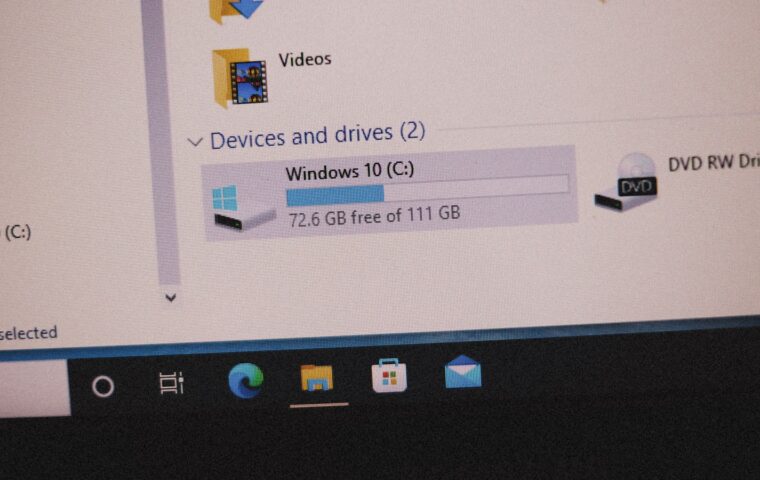
Buy a drive labelled with a certain capacity, plug it in, and the computer reports noticeably less than the label promised. A drive sold as one terabyte shows around 931 gigabytes, and people wonder where the missing space went, or whether the drive is faulty. Nothing is wrong, and no space is missing. The gap comes from two industries measuring the same thing differently, plus a little overhead, and understanding it removes a common and needless worry.
Two ways of counting
The core of the mystery is that drive makers and computers count capacity differently. Drive makers measure capacity using round decimal units, where each larger unit is a thousand of the smaller, while computers traditionally measure using binary units, where each larger unit is 1,024 of the smaller. Because the two counting systems diverge, the same physical capacity produces a larger number in the maker’s decimal counting than in the computer’s binary counting, so the drive is honestly the capacity on the label by one measure but shows less by the other. This difference in counting, not any missing space, is the main reason the reported capacity is lower than the label, the two-definitions issue the article on reading storage honestly touches on.
The arithmetic, and why it grows
The gap between the two counting systems is not fixed but grows with capacity, because the divergence compounds at each larger unit. At smaller capacities the difference is modest, but at larger capacities it becomes substantial, which is why a large drive shows a larger shortfall in gigabytes than a small one, though the percentage is similar. This is why a one terabyte drive shows around 931 gigabytes, a roughly seven percent difference that is purely the counting systems diverging, and why larger drives show proportionally the same but numerically larger gaps. Understanding that the difference scales with capacity explains why bigger drives seem to lose more, when in fact they lose the same proportion, the scaling arithmetic our coverage of how storage figures work reflects.
| Labelled | Roughly shows |
|---|---|
| 1 TB | About 931 GB |
| 2 TB | About 1.86 TB |
| 512 GB | About 476 GB |
| 256 GB | About 238 GB |
File system overhead
On top of the counting difference, a smaller amount of capacity is genuinely used by the file system, the structure the drive uses to organise and track files. Formatting a drive creates this structure, which consumes a little space, and there may also be reserved areas the system keeps for its own use. This overhead is real but small compared with the counting difference, and it is necessary for the drive to function, since without the file system the drive could not store files in an organised way. So a small part of the shortfall is genuine overhead, while the large part is the counting difference, together accounting for the full gap between the label and the reported capacity, the necessary-overhead point the breakdown of how drives organise data reflects.
Reserved and recovery partitions
Some of a drive’s capacity may also be set aside for reserved or recovery partitions, particularly on a computer’s main drive. Manufacturers often include a recovery partition holding the software to restore the system, and the operating system may reserve areas for its own functions, all of which reduce the space available for your files. This is why a new computer’s drive can show even less free space than the counting difference alone would explain, since these partitions occupy additional capacity. They serve real purposes, recovery and system function, so the space is not wasted, but it is another reason the usable space is less than the label, the reserved-space point our piece on how systems protect and organise data reflects.
Is the drive faulty?
The reassuring conclusion is that a drive showing less than its labelled capacity is completely normal and not faulty, provided the shortfall matches the expected counting difference plus overhead. A one terabyte drive showing around 931 gigabytes is exactly right, not defective, and the same proportional shortfall applies to all drives. A drive would only be suspect if it showed dramatically less than expected, far beyond the counting difference and normal overhead, which would suggest a real problem. For the normal, expected shortfall, there is nothing to fix and nothing wrong: the drive holds the capacity it should, counted the maker’s way, and shows less only because the computer counts differently, a normal discrepancy every drive exhibits, the reassurance our guide to understanding hardware figures reflects.
Why the discrepancy persists
It is reasonable to wonder why this confusing discrepancy has not been resolved, and the answer is that the two industries are entrenched in their different counting systems. Drive makers use decimal counting, which gives larger, more attractive capacity numbers, while computers have traditionally used binary counting, which reflects how they actually address memory. Neither is wrong; they are different conventions, and both persist, so the gap between the label and the reported capacity continues to appear on every drive. Understanding that this is a difference of convention, not a deception or a defect, is the key to not worrying about it.
For the buyer, the practical implication is simply to expect the reported capacity to be somewhat less than the label, by a predictable proportion, and to plan accordingly. If you need a certain amount of usable space, buy a drive labelled somewhat larger to account for the counting difference and overhead, so the usable space meets your need. This is not a trick to work around but a normal adjustment, once you understand it, that ensures you get the space you actually want. Knowing why the numbers differ turns a moment of confusion or suspicion into a simple, expected adjustment, letting you buy the right capacity confidently rather than feeling shortchanged by a discrepancy that is entirely normal.
Questions readers ask
Why does my 1TB drive show 931GB?
Because drive makers count capacity in decimal units while computers traditionally count in binary units, and the two diverge, so the same capacity shows a smaller number to the computer. A one terabyte drive is honestly that capacity by the maker’s decimal counting but shows around 931 gigabytes by the computer’s binary counting. A little is also used by the file system. Nothing is missing or faulty; the two systems simply count differently.
Is my drive faulty if capacity is lower?
No, provided the shortfall matches the expected counting difference plus a little file system overhead, which for a one terabyte drive means showing around 931 gigabytes. That is normal and correct, not defective. A drive would only be suspect if it showed dramatically less than expected, far beyond the normal difference, which would suggest a real problem. The usual, expected shortfall is simply the two counting systems diverging.
Do all drives lose the same percentage?
Roughly yes, because the difference comes from the counting systems, which diverge by a consistent proportion, about seven percent at the terabyte scale. Larger drives show a numerically larger gap in gigabytes but the same proportional shortfall. File system overhead and any reserved partitions add a little more, which can vary, but the main counting difference is proportionally consistent across drives of all sizes.