Push a modern single-board computer hard enough and it quietly slows itself down to avoid overheating, which means the cooling you fit directly shapes how fast the board actually runs during sustained work. A bare board, a stick-on heatsink, a metal case, and a small fan each settle at a different temperature, and each therefore holds a different clock speed once the workload stops being brief. This guide explains where the throttle points sit, how the main cooling styles compare on temperature and noise, which cases make matters worse, and how to measure sustained clocks for yourself.
Where boards start throttling
Recent Raspberry Pi models begin easing their clock back at 80 degrees Celsius and apply a firmer cap at 85. The processor does this to protect itself, trading speed for safety, so the first sign of trouble is not a crash but a gradual loss of performance. A Pi 5 draws more power and runs hotter than the Pi 4 before it, and under a steady full load with no cooling it reaches the throttle point within minutes.
The throttle is not a fixed penalty; it scales with how far over the limit the chip sits. A board grazing 80 degrees loses a little speed, while one pinned at 85 or beyond loses much more. That is why two identical boards can post very different sustained results, one kept in the sixties by a heatsink and the other left bare in a warm room. A sagging power supply produces the same slowdown by a separate route, the point our rundown on feeding a board enough power makes, so a slow board is worth checking on both fronts.
Passive heatsinks
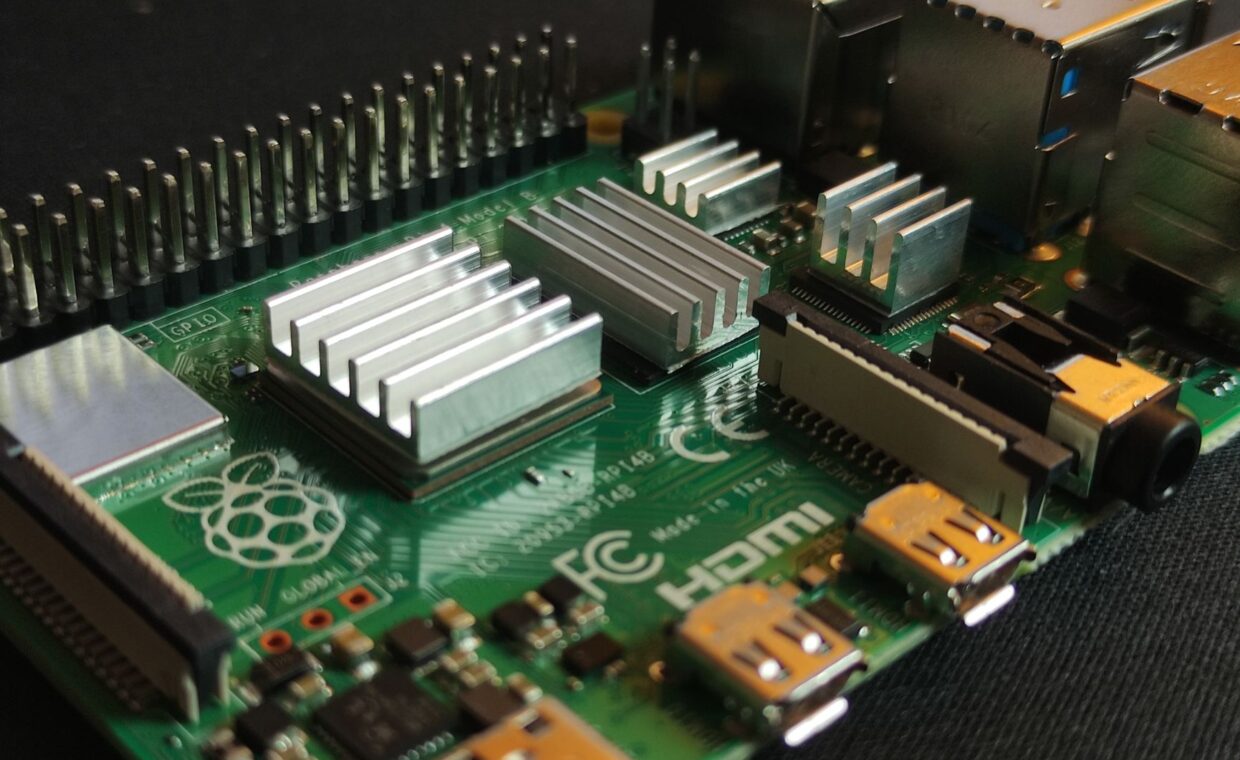
A heatsink adds metal mass and surface area, giving heat somewhere to spread before it builds up inside the chip. Small stick-on aluminum blocks shave a few degrees and delay the moment throttling begins, which is often enough for light or bursty loads. A large heatsink, or a case milled to act as one giant sink, does far more and can keep a moderately loaded board comfortably clear of the limit.
Passive cooling has a ceiling, though. Under a genuine full load held for many minutes, a bare heatsink on a Pi 5 can still creep up to the throttle point, especially in a warm room with no air moving past it. The quality of contact matters too, since a thin thermal pad or a smear of paste that fills the microscopic gaps carries heat far better than bare metal resting on metal.
Active cooling and noise
A fan changes the picture by moving air across the heatsink or board, and it can hold a heavily loaded Pi in the fifties or low sixties, well under any throttle. The official active cooler pairs a small heatsink with a fan that ramps up and down according to temperature, staying silent at idle and only spinning audibly once the chip warms. That temperature-linked control is the difference between a fan you forget and one that whines all day.
Small fans do carry downsides. Cheap ones with sleeve bearings can develop a buzz and a shorter life than ball-bearing types, and any fan pulls in dust that gradually clogs the fins. A fan also adds to the board’s power budget, a real consideration for off-grid builds the guide on running from batteries or panels covers. For a desk that stays quiet most of the time, a ramping fan is usually the right balance.
| Cooling approach | Temperature under sustained load | Sustained clock | Noise |
|---|---|---|---|
| Bare board | Reaches 80 to 85 C, throttles | Reduced | Silent |
| Stick-on heatsink | High 70s C | Near full, may dip | Silent |
| Metal heatsink case | Around 60 to 70 C | Full | Silent |
| Active fan cooler | 50 to 60 C | Full | Low, ramps with load |
Cases that trap heat
An enclosure changes airflow, sometimes for the worse. A sealed plastic box with no vents surrounds the board in still, warming air and can push temperatures higher than leaving it bare on the bench. The early official Pi 4 case became a well-known example, fine for gentle use and poor under sustained load because nothing let the heat escape.
Metal heatsink cases take the opposite approach, clamping to the chip and turning the whole shell into a radiator, which works well. Trouble also comes from stacking, since add-on boards mounted over the processor block the rising heat, and cramped enclosures with a fan but no clear intake and exhaust path simply recirculate warm air instead of replacing it. Airflow in and out matters as much as the cooler itself.
Measuring sustained clocks under load
Guesswork is unnecessary because the board reports its own state. The vcgencmd tool reads the core temperature, the current ARM clock, and a throttling bitmask that flags whether the chip is holding back right now or has done so since boot. Run a stress tool for ten to fifteen minutes and watch those three numbers settle rather than trusting the first-minute peak, which always flatters.
The figure that counts is the clock after everything reaches thermal balance, since that is the speed your long jobs actually receive. The same throttle flags also expose under-voltage, so a weak supply and a hot chip can both be caught in one reading. Checking those numbers over the network rather than on an attached screen suits the approach the walkthrough on running a board without a screen describes.
Choosing what to fit
Cooling is not about chasing the lowest possible temperature; it is about keeping the board below its throttle point during the work you actually give it. A board serving a few web pages may never need more than a small heatsink, while one transcoding video or compiling code benefits from a ramping fan or a heatsink case. How hard you push the chip comes back to the job, the range the article on typical board tasks lays out.
Fit the cooling to that honest picture of the load, mind the airflow around whatever case you choose, and confirm the result by watching the sustained clock rather than the opening reading. A quiet, correctly cooled board holds its full speed indefinitely, which is the whole reason for paying attention to temperature in the first place.
Questions people ask most
Does a Raspberry Pi need a fan?
Not always. A Pi 4 or 5 under light or occasional load can run within limits on a heatsink alone, and many stay cool enough bare. A fan becomes worthwhile once the board holds a heavy load for long stretches, such as transcoding or compiling, where passive cooling drifts up to the throttle point. A ramping fan stays silent until the chip actually warms.
At what temperature does a Pi throttle?
Recent Raspberry Pi boards start reducing their clock at 80 degrees Celsius and apply a firmer cap at 85. The reduction scales with temperature, so a board just touching 80 loses only a little speed while one held at 85 or above loses much more. Keeping the chip in the sixties or low seventies under load avoids the penalty entirely and preserves full performance.
Do heatsink cases actually work?
Yes, when they are metal and clamp firmly to the processor through a thermal pad. Such cases turn the entire shell into a radiator and can hold a loaded board in the sixties without any fan. Sealed plastic cases do the opposite, trapping warm air and pushing temperatures up. The result depends on the material and the contact quality, not the label on the box.