Slow Wi-Fi in the back bedroom usually gets blamed on the internet plan or an ageing router, and people spend money before checking the one thing that costs nothing to change: where the box actually sits. A router pushed into a cupboard, tucked behind the television, or parked on the floor in a corner is fighting its own signal before it reaches anyone. This guide walks through the placement mistakes that quietly shrink home coverage, why each one matters, and how to fix them, along with the point where moving the router stops helping and more hardware becomes the honest answer.
Why hiding the router costs coverage
Wi-Fi is radio, and radio passes through open air far better than through solid matter. A router shut inside a media cabinet is broadcasting through wood on every side, and each surface it crosses steals a little strength. Metal is worse, because it reflects the signal rather than letting it pass, so a router next to a filing cabinet, a fridge or a metal shelf loses energy in the wrong direction. Corners compound the problem by sending half the signal outward through an exterior wall and into the garden, where nobody needs it.
The floor is another quiet mistake. Signal spreads outward and slightly downward, so a router on the carpet aims much of its coverage into the ground and the room below. Lifting it onto a shelf and pulling it out of enclosed furniture often does more for a weak connection than any setting change, and it costs nothing but a few minutes of rearranging.
Height, centre and clear lines
Three placement basics do most of the work. Height comes first: a router raised to shelf or wall-mount level clears furniture and radiates over a room rather than into it. Centrality comes next, because signal weakens with distance and through walls, so a router in the middle of the home reaches the edges more evenly than one shoved against a boundary wall. Clear line of sight comes third, meaning the fewer solid objects between the router and where you sit, the stronger the link.
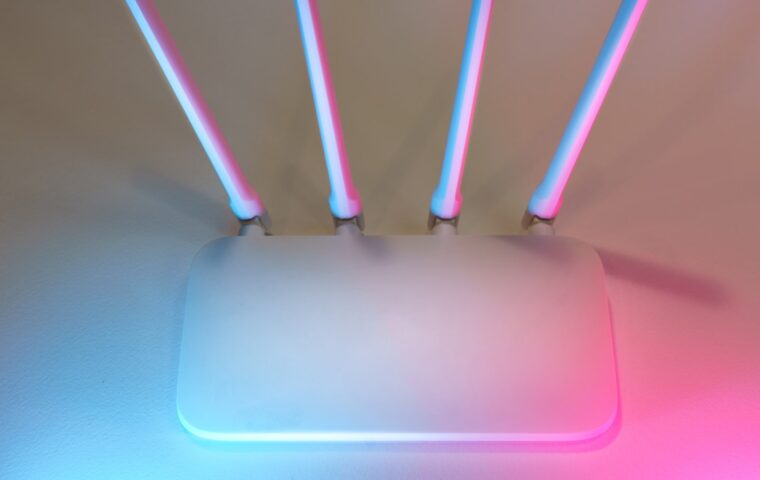
Antenna angle plays into this too. External antennas spread signal in a doughnut shape at right angles to their length, so standing them upright favours coverage across a floor, while laying one flat helps reach an upstairs room. How many antennas a router carries and how they cooperate is a separate topic the guide on what extra antennas actually do covers, but their orientation is part of placement.
What interferes with the signal
Some household objects actively disrupt Wi-Fi rather than merely blocking it. A microwave oven leaks energy in the same 2.4GHz band many devices use, so a router beside one can stutter every time somebody heats lunch. Cordless phones, some baby monitors and older wireless gadgets crowd the same frequencies. Large volumes of water absorb signal well, which is why a fish tank or even a stack of full water bottles between rooms hurts more than people expect.
Dense building materials matter as much as gadgets. Brick, concrete, stone and tiled walls cut signal sharply, and mirrors, with their metal backing, reflect it. Keeping the router a metre or so away from big metal appliances and out of the kitchen where possible avoids the worst offenders, a set of causes the article on what disrupts a home signal works through in more depth.
The placement mistakes worth fixing first
If coverage is patchy, work through these in order, because the early ones fix the most for the least effort.
- Move the router out of any closed cabinet, drawer or cupboard into open air.
- Lift it off the floor to at least desk height, higher if a shelf allows.
- Relocate it toward the centre of the home rather than an outside wall or corner.
- Put at least a metre between it and the microwave, fridge or other large metal objects.
- Stand the antennas upright for single-floor coverage, and clear bulky items from the direct path to where you use devices most.
When placement is not the problem
There is a limit to what moving one box can do. A large home, a long thin flat, or thick internal walls can leave a dead room no matter how well the router is positioned, simply because the distance and obstacles are too much for a single transmitter. Recognising that point saves hours of shuffling furniture to no effect.
Two routes solve it. A mesh system replaces the single router with several units that hand devices between them for one continuous network, the approach the comparison on one router versus a mesh set weighs up. Alternatively, adding a wired access point or a range extender pushes coverage into the far room, and the differences between those options are set out in the walkthrough on extenders against wired access points. Either way, the fix is more coverage, not more shuffling.
Where this leaves you
Good placement is mostly common sense once the reasons are clear: keep the router high, central, in open air, and away from metal, water and appliances that share its frequencies. Those changes cost nothing and often turn a frustrating connection into a steady one, which is why they are worth trying before spending on new equipment or a faster plan that a badly placed router cannot deliver anyway.
When the home is simply too large or too broken up by walls for one unit to cover, that is not a failure of placement but a limit of physics, and the answer is to spread the signal with mesh nodes or extra access points. Start with the free fixes, confirm how far they get you, and only then decide whether more hardware is genuinely needed. The order matters, because it stops you paying to solve a problem a shelf could have fixed.
Answers to common questions
Where is the best place to put my router?
As close to the centre of your home as the cabling allows, raised to shelf or wall height, and out in the open rather than inside furniture. Keep it away from the kitchen, large metal objects and water tanks, and give it a clear line toward the rooms you use most. Central, high and unobstructed beats a corner near the front door almost every time.
Should my router be high up or down low?
High up. Signal radiates outward and slightly downward, so a router on the floor sends much of its coverage into the ground and the room below. Placing it on a shelf, a wall mount or the top of a bookcase lets the signal spread across the room and over furniture. Aim for roughly head height or above for the most even coverage.
Why is my Wi-Fi weak in one room?
Usually distance and whatever sits between that room and the router. Thick walls, a chimney breast, a mirror, a fish tank or a metal appliance in the path all sap signal. Try moving the router more central and higher first. If one room stays weak after that, it is likely too far or too shielded, and a mesh node or access point nearby will help.