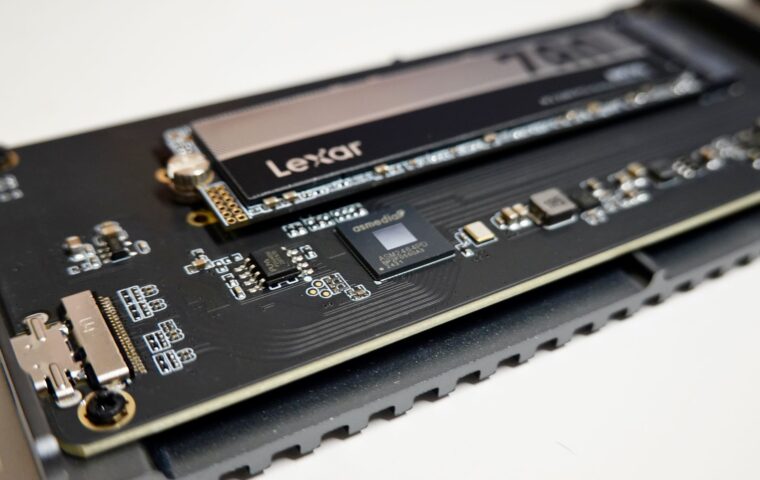
A drive rated to absorb hundreds of terabytes of writes can reach that figure sooner than the label suggests, because the flash rarely commits only what you asked it to. Save a small change and the controller may rewrite far more than the change itself, quietly spending endurance that never shows on any progress bar. The ratio between data the host sends and data actually written to flash has a name, write amplification, and understanding it explains uneven wear, why certain workloads punish drives, and which habits keep the multiplier close to one.
Why flash erases in blocks
Flash memory has an awkward asymmetry built into its physics. The controller can write into an empty page freely, yet it cannot rewrite a page that already holds data. To reuse that space it must first erase, and erasing never happens page by page. It happens across an entire block, typically several megabytes covering many pages at once. Reading is quick and precise, writing is quick into blank space, but erasing is coarse and comparatively slow.
That single constraint forces the drive into indirect behaviour. When part of a block needs changing, the controller cannot simply edit it in place, so it works around the erase rule by relocating data. Everything labelled write amplification grows out of this gap between the fine grain of writing and the blunt grain of erasing.
How a small write becomes a big one
Picture a block already full of valid data, and the system wants to update just four kilobytes inside it. The controller cannot overwrite those bytes directly. Instead it reads the surrounding data, merges in the change, writes the whole lot to a fresh block, and marks the old block for erasure later. A tiny logical request has triggered a physical operation many times its size.
Multiply that across a busy system and the arithmetic adds up fast. A gigabyte of genuine changes can translate into several gigabytes physically written once the read, merge, and rewrite cycles are counted. The endurance rating on the box measures physical writes, so amplification is effectively a tax on the lifespan figure you were quoted, the wear budget the primer on how flash endurance is spent lays out in full.
Background housekeeping adds its own share on top of that. When the drive later erases a retired block, it first rescues any pages inside that still hold live data, copying them once more to safety before the erase can proceed. Those rescue writes never came from the host at all, yet they wear the flash exactly as much as real data does, which is why the measured ratio counts them without any allowance.
Wear levelling and spare area
Two controller features push the multiplier in opposite directions, and both are worth knowing. Wear levelling deliberately spreads writes so no single block ages far ahead of the rest, which prevents early failure but sometimes means shuffling otherwise idle data to even out the load. That relocation is itself extra writing, a modest cost paid for longevity.
Spare area, often called over-provisioning, is capacity the drive keeps hidden from the operating system. This reserve gives garbage collection room to assemble clean blocks without stalling, which lowers amplification because the controller is rarely cornered into frantic rewrites. Amplification is a property of the flash and its controller rather than the connector, so it behaves the same whether the drive is an M.2 stick or a cabled unit, a point the tour of the physical shapes drives take helps keep separate.
The size of that reserve varies by drive class. Many consumer models set aside roughly seven percent of their raw flash, while units built for write-heavy servers hold back far more, sometimes close to a quarter, precisely to keep amplification low under relentless load. You can imitate the idea at home by leaving a slice of the drive unpartitioned, which hands the controller extra working room and tends to steady both speed and wear on a disk you expect to keep busy.
Workloads that multiply writes
Not every task stresses a drive equally. The pattern of writes matters more than their total volume, and small scattered updates are the harshest kind. A single application writing steadily in tiny increments can wear a drive faster than another moving ten times the data in long, orderly sweeps. Because the worst offenders are particular programs, running databases or virtual machines on a drive apart from your everyday system keeps their churn off the disk the whole computer depends on, the split the article on separating system and data drives examines.
| Workload | Write pattern | Amplification tendency |
|---|---|---|
| Large file copies | Long sequential writes | Low, close to one |
| Video capture | Steady sequential stream | Low |
| Database logging | Frequent small random writes | High |
| Virtual machines | Mixed small syncs | Moderate to high |
| Near-full drive | Any writes, little free space | Rises sharply |
Keeping the multiplier down
The most effective habit is leaving genuine free space. A drive with room to breathe lets garbage collection gather clean blocks calmly, while one packed to the brim forces constant rewriting just to find somewhere to put new data. Choosing a capacity with headroom rather than the smallest that fits pays back in both speed and endurance, a sizing trade-off the explainer on picking a sensible capacity talks through.
Beyond that, keep TRIM enabled so the drive knows what it can discard, and prefer applications that batch writes over ones that sync tiny records constantly. On older installations it is also worth confirming the partition is properly aligned, since a misaligned start can split single writes across two blocks and quietly double the effort, though current systems arrange this correctly on their own.
What this means in practice
Write amplification is not a defect to hunt down, it is a normal consequence of how flash is built, and modern controllers already work hard to keep it low. For most people the figure sits close enough to one that the rated endurance comfortably outlasts the useful life of the machine. The number only becomes a concern under sustained, small, random writes on a drive kept perpetually full.
Rather than tracking exact ratios, aim at the conditions that keep them healthy. Buy enough capacity that the drive is rarely more than three quarters full, leave TRIM on, and match the drive class to the workload if you run databases or virtual machines all day. Do that and amplification quietly stays in the background, which is exactly where a well-behaved drive keeps it.
Questions readers ask
What is write amplification?
Write amplification is the ratio between the amount of data a computer asks an SSD to write and the larger amount the drive physically commits to flash. It happens because flash erases in big blocks but writes in small pages, so updating a little data often means relocating a lot. A ratio near one is ideal, while high ratios spend endurance faster and can slow the drive.
Why does my SSD wear faster than expected?
Endurance ratings count physical writes, and amplification means the drive writes more than you send it. A drive kept almost full, or one handling many small random writes from databases, logs, or virtual machines, amplifies heavily and burns through its budget sooner. Freeing space, keeping TRIM active, and reducing tiny constant syncs usually brings the real wear rate back toward the figure you expected.
Do small writes hurt an SSD?
Individually they are harmless, but a constant stream of tiny random writes is the pattern most likely to raise amplification. Each small change can force the controller to read, merge, and rewrite a much larger block, so the physical wear outweighs the data volume. Occasional small writes are nothing to worry about, though heavy sustained logging on a nearly full drive is worth managing.