Building or upgrading a computer now means meeting two memory generations on the shelf, DDR4 and DDR5, that share a name and almost nothing else physically. The newer standard promises higher numbers on every spec, yet the price gap and some awkward compatibility rules make the choice less obvious than newer equals better. Whether the jump is worth paying for depends heavily on the processor, the workload, and the platform you are committing to. This guide lays out where the two genuinely differ, where the differences vanish in real use, and when DDR5 earns its premium.
What actually changed between the generations
DDR5 raises the headline data rate sharply. Mainstream DDR4 runs around 3200 megatransfers per second, while common DDR5 starts near 4800 and reaches 6000 or higher, roughly doubling peak bandwidth. It also drops operating voltage slightly, from 1.2 volts to 1.1, and moves power regulation onto the memory stick itself, which helps stability at high speeds. Capacities per stick climb too, easing very large memory builds. Kits normally ship as two matching sticks so the memory runs in dual channel, which widens the path to the processor and often matters more to real speed than chasing the single highest rated number.
Latency is where the story turns. DDR5’s higher speed comes with higher raw timing numbers, so the time to first response can be similar to or slightly worse than good DDR4. Peak bandwidth is only one part of memory performance, and how a chip actually reaches that bandwidth, which our piece on what determines a chip’s memory bandwidth explains, depends on more than the sticker speed.
Why higher data rates do not always feel faster
Bandwidth and latency pull in different directions. DDR5 moves more data per second, which helps tasks that stream large amounts of memory at once, such as video editing, heavy multitasking, and some simulation. Latency, the delay before the first byte arrives, matters more for tasks that make many small, scattered requests, and here DDR4’s tighter timings can keep it competitive.
The result is that everyday work, browsing, office tasks, and most gaming, often shows only a small gap between a fast DDR4 kit and a mid-speed DDR5 one. The processor’s own design decides how much of the extra bandwidth it can put to use, a role our guide to what the memory controller decides spells out. In many titles a 6000 megatransfer DDR5 kit and a carefully chosen 3600 DDR4 kit finish within a few percent of each other, because the graphics card sets the pace long before memory becomes the limit.
| Factor | DDR4 | DDR5 |
|---|---|---|
| Common speed | 2666 to 3600 megatransfers | 4800 to 6400 megatransfers |
| Voltage | 1.2 volts | 1.1 volts, regulated on stick |
| Real first response | Low and mature | Similar or slightly higher |
| Price per kit | Cheaper, widely stocked | Higher, though falling |
| Platform support | Older and some current boards | Current and future boards |
Capacity, stability, and built-in error checking
Beyond raw speed, DDR5 changes some fundamentals that affect stability. Each module now carries its own small power management chip, taking that task from the motherboard and delivering cleaner, more consistent voltage at high data rates. That on-stick regulation is part of why DDR5 can sustain speeds that would be difficult on the older design.
DDR5 also adds on-die error correction, a basic check built into every chip that catches and repairs minor bit errors as they occur. This is not the full error-correcting memory used in servers, and it exists mainly to keep the very dense, fast chips reliable, but it does help everyday stability. Higher per-module capacities, reaching 32 and 48 gigabytes on a single stick, also make large builds simpler than DDR4 usually allowed.
They do not fit the same motherboards
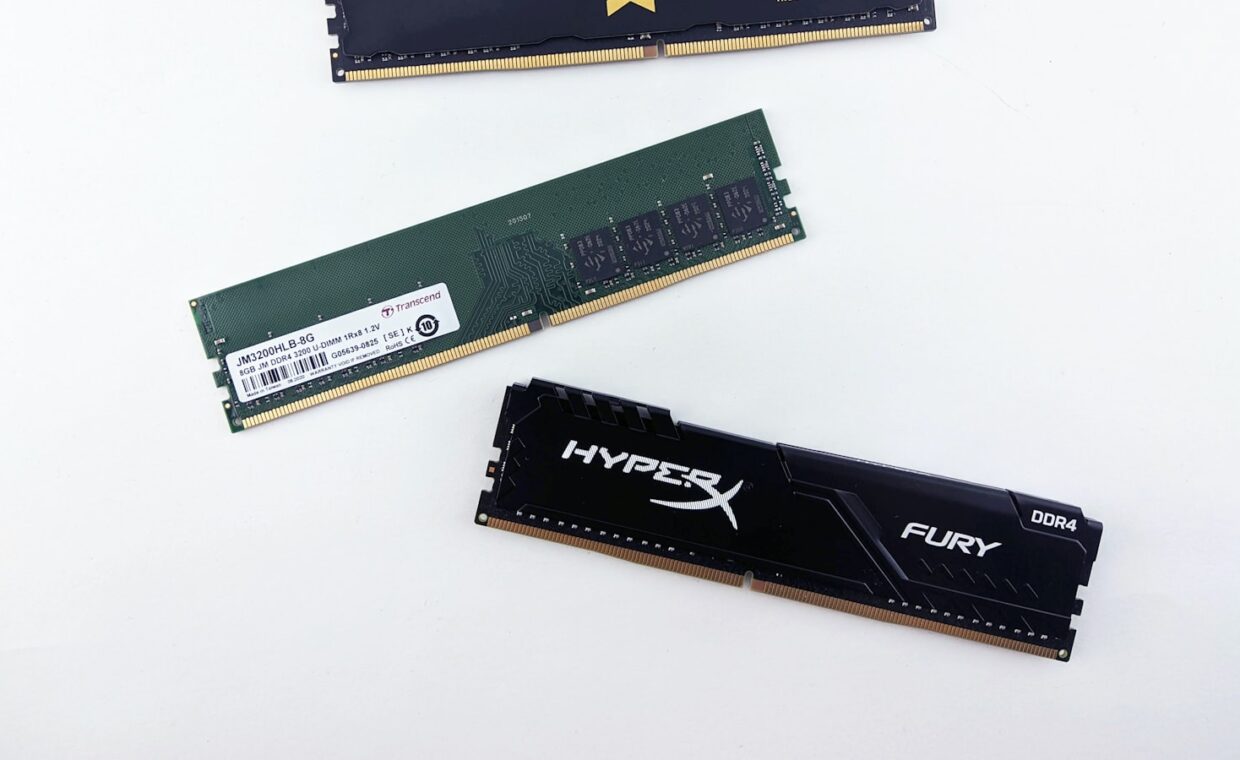
DDR4 and DDR5 are not interchangeable. The sticks have differently placed notches and different pin arrangements, so a DDR5 module will not physically seat in a DDR4 slot, and no adapter bridges them. Just as important, the processor and its memory controller are built for one standard or the other, and the motherboard follows suit. The electrical signalling and pin layout differ as well, so no physical adapter could bridge the two standards reliably even if the notches happened to line up.
A few boards from the transition period offered either DDR4 or DDR5 versions of the same model, but never both slot types on one board. Choosing a platform therefore locks the memory type for that build. Confirming what a given chip supports before buying, something the primer on reading a processor’s specifications helps you do, avoids an expensive mismatch.
When DDR5 is worth paying for
On a new build with a current processor, DDR5 is usually the sensible default, since the platform expects it, prices have fallen close to DDR4, and the memory will carry into future upgrades. The extra bandwidth genuinely helps content creation, large compiles, and running many demanding programs at once. Early DDR5 carried a steep premium, but that has narrowed to a modest gap on mainstream kits, which weakens any case for choosing an older platform purely to save on memory.
It also matters for systems relying on integrated graphics, because that graphics hardware borrows system memory and benefits directly from the higher bandwidth, the point the explainer on how integrated graphics use memory makes. For a pure gaming machine with a separate graphics card, or a budget build on an older socket, fast DDR4 remains a reasonable and cheaper choice. The same logic applies to many laptops and small form factor systems, where the memory type is fixed by the platform and rarely something the buyer picks separately.
Making the choice
Let the processor and board lead. If the platform you want uses DDR5, buy DDR5 and choose a speed the chip officially supports rather than the most expensive kit on the shelf. If you are extending an existing DDR4 system or building tight to a budget, good DDR4 still delivers a strong experience for gaming and ordinary work.
The generation gap is real but narrower in daily use than the raw numbers imply. DDR5 buys bandwidth and a longer upgrade path, DDR4 buys maturity and lower cost. Deciding which of those you value, against the platform you have chosen, settles the question more cleanly than comparing speed figures alone.
Common questions
Can I put DDR5 in a DDR4 motherboard?
No. The two are physically and electrically different, with notches in different positions, so a DDR5 stick cannot seat in a DDR4 slot and no adapter exists. The motherboard and processor are designed for one memory type only. If you want DDR5, you need a compatible processor and a DDR5 motherboard, which usually means a newer platform overall.
Is DDR5 noticeably faster for gaming?
Usually only a little, when a separate graphics card does the heavy lifting. Most games depend far more on the graphics card and processor than on memory bandwidth, so a fast DDR4 kit and a mid-speed DDR5 kit often land within a few frames of each other. DDR5 helps more in memory-heavy titles and when the processor leans on integrated graphics.
Does DDR5’s higher latency cancel out its speed?
Partly, for some tasks, but not across the board. DDR5’s raw timing numbers look worse, yet its far greater bandwidth wins in workloads that move large blocks of data. For scattered small requests, the higher latency can erase the advantage, leaving performance close to DDR4. The net effect depends entirely on the workload rather than the specification sheet.