A multimeter is the first tool worth owning for anyone poking at electronics, because it turns invisible electrical behaviour into a number you can read. With one you can tell whether a battery still holds charge, whether a wire carries a signal or is broken inside its insulation, and whether a component is the right value. The instrument looks busy at first, but everyday use comes down to three measurements. The sections below cover voltage, continuity, and resistance, and how to take each without harming yourself or the meter.
Reading the dial
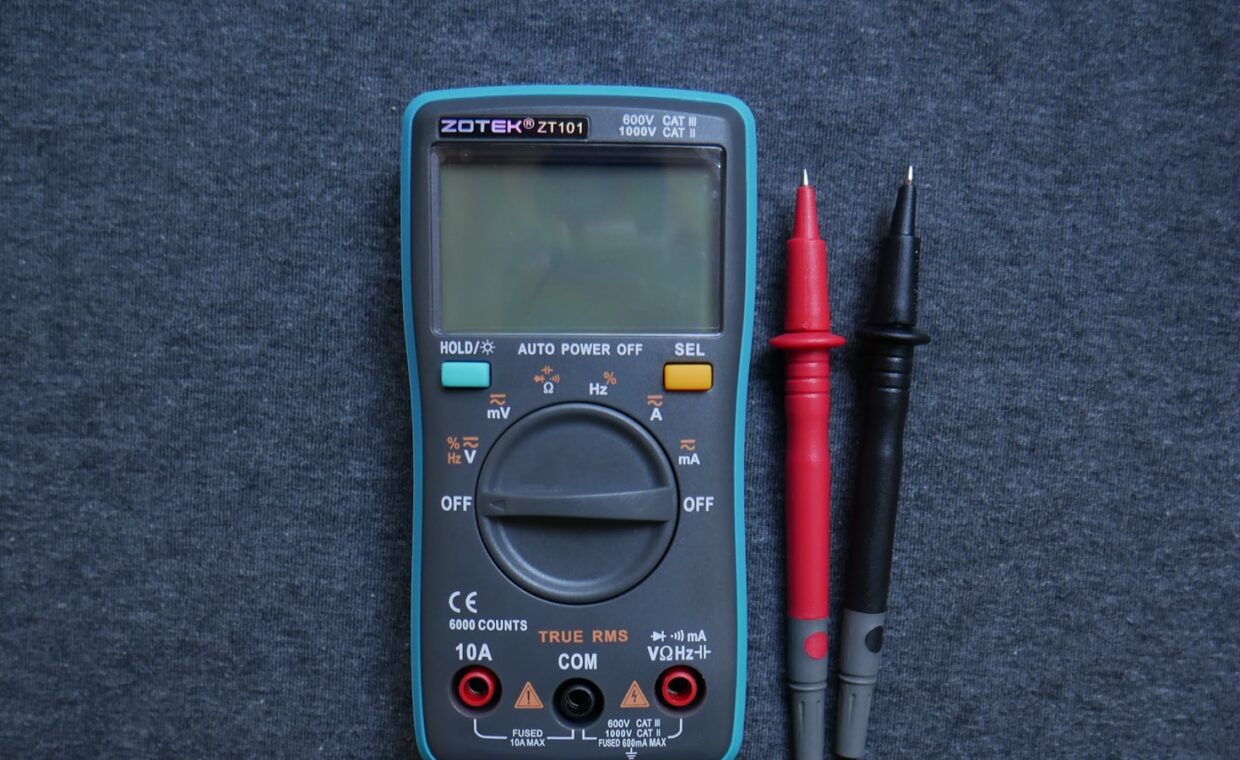
The rotary dial selects what the meter measures, and most of its positions fall into a few groups. The V with a straight line, or the letters DC, marks direct-current voltage, used for batteries and electronic supplies. The V with a wavy line marks alternating-current voltage, used for mains, which beginners should treat with caution. The horseshoe symbol, the Greek letter omega, selects resistance in ohms, and the same region usually carries a continuity setting shown by a small sound-wave icon. Some meters add a position for testing diodes and another for measuring current in amps. On a manual-ranging meter you also pick a range, a maximum the reading will not exceed, chosen comfortably above the value you expect. Before deciding a board is faulty, it is often worth measuring whether its supply is delivering power at all, a check our look at choosing a Raspberry Pi power supply treats as a first step.
Measuring DC voltage on a battery or supply
Voltage is measured with the probes touching two points while the circuit is powered, because voltage is the difference between them.
- Set the dial to DC voltage, and on a manual meter pick a range above the expected value, such as the 20 volt range for anything up to twenty volts.
- Put the black probe in the socket marked COM and the red probe in the socket marked with a V.
- Touch the black probe to the negative point, the battery’s minus terminal or the circuit’s ground.
- Touch the red probe to the positive point you want to measure.
- Read the display: a fresh AA cell shows about 1.5 volts, a car battery near 12.6 volts at rest.
A reading close to the rated value means the source is healthy; a reading well below it, especially under load, points to a tired battery or a supply that cannot hold its voltage. This is the standard way to check a battery pack or a solar setup, the kind of source our rundown on powering projects from batteries or solar covers.
Finding breaks and shorts with continuity
Continuity mode answers a yes-or-no question: are these two points electrically joined? The meter sends a tiny current between the probes and beeps if it flows freely, meaning near-zero resistance. This is done with the power off, never on a live circuit. Touch the two probes together first to hear the confirming beep and know the mode works. Then place the probes at the two ends of a wire, a fuse, or a track: a beep means the path is intact, silence means it is broken. The same test finds shorts, where two points that should be separate are connected, by beeping when it should stay silent. It is the quickest way to trace a suspected break inside a cable or to confirm a solder joint, including the wiring between a sensor and the board reading it, the kind of link the guide on connecting sensors to a small computer relies on.
Reading resistance, and the usual mistakes
Resistance is measured in ohms with the component out of the circuit, or at least with power removed and one leg lifted, because other parts wired in parallel will skew the reading. Set the dial to the ohms region, touch the probes across the component, and read the value. A resistor should read close to its marked value; an open one reads infinite, shown as OL or a lone 1 on the left of the display.
Two mistakes are common. The first is measuring resistance in a powered circuit, which gives nonsense and can damage the meter, so resistance is always a power-off measurement. The second is pinching both metal probe tips between your fingers, since your body has its own resistance and adds itself to the reading, so hold the insulated parts of the probes instead. On a manual meter, a reading of OL often just means the range is set too low, so step up until a number appears.
Working safely and knowing the limits
A few habits keep both you and the meter intact. Keep one hand behind your back when measuring anything above roughly fifty volts, so a slip cannot send current across your chest. Check that the probes sit in the correct sockets before each measurement, because the current sockets are the usual cause of accidents. Never measure resistance or continuity on a live circuit, and never leave the meter set to current when you next go to read voltage. Start on a higher range and work down when a value is unknown. These small routines matter most for anything you intend to leave running unattended, where a wiring fault can go unnoticed, the situation the walkthrough on keeping an always-on project powered works through.
Where this leaves you
Three measurements carry most of the work a multimeter does. Voltage tells you whether power is present and at the right level, continuity tells you whether a connection exists, and resistance tells you a component’s value or whether it has failed open. Learning to take those three cleanly, with the probes in the right sockets and the circuit in the right state, covers the great majority of everyday testing, from checking a battery to hunting down a broken wire.
The instrument rewards a little caution more than any special skill. Most errors come from the wrong dial position, the wrong socket, or measuring resistance on a circuit that still has power, and all three are avoided by a quick glance before the probes touch anything. Set the meter deliberately, expect a rough value before you read, and treat any surprising number as a reason to check your setup rather than to trust the surprise. Used that way, a basic meter answers most of the electrical questions a project will ever raise.
Quick answers
What multimeter settings do I actually need?
For most work, three. DC voltage, marked V with a straight line, checks batteries and electronic supplies. Continuity, the sound-wave icon, tells you whether two points are connected and finds broken wires. Resistance, the omega symbol, reads a component’s value in ohms. Alternating-current voltage and current modes exist for specific jobs, but voltage, continuity, and resistance cover the majority of the testing a beginner will do.
How do I test if a wire or fuse is broken?
Use continuity mode with the power off. Set the dial to the continuity setting, touch the probes together to confirm the meter beeps, then place one probe at each end of the wire or fuse. A beep means the path is intact; silence means it is broken and needs replacing. For a fuse this is faster and surer than a visual check, since a fuse can fail without any visible sign.
Can I damage my multimeter measuring the wrong thing?
Yes, in a few ways. Measuring resistance or continuity on a live circuit can harm the meter, and leaving it set to current, then touching the probes across a voltage source, sends a heavy current through it and can blow its internal fuse. Choosing a range far too low is usually harmless and just shows OL. Checking the dial and the sockets before each measurement prevents almost all such damage.